Showing posts with label kura. Show all posts

Monday, January 4, 2016

Managing Camel routes with Kura web UI

This repost of my DZone article - Managing Camel Routes With Kura Web UI.

In my previous post about Camel and Kura integration I demonstrated how to easily deploy Camel routes into Kura using Rhiot. In this article I would like to elaborate a little bit on how to manage Camel routes from the level of the Kura web UI.

Loading XML routes using SCR property


RhiotKuraRouter comes with a RhiotKuraRouter#updated(Map) method. The primary purpose of this callback is to allow a router to be a SCR component configured using the Kura Web UI and EuroTech Everyware Cloud, however you can use this callback outside the web UI and Everyware Cloud context.

Whenever RhiotKuraRouter#updated(Map) callback is executed, RhiotKuraRouter tries to read camel.route.xml property value (RhiotKuraConstants.XML_ROUTE_PROPERTY key constant), to parse its value and load it as an XML Camel routes. For example if the camel.route.xml property will be set to the following value...

<routes xmlns="http://camel.apache.org/schema/spring">
    <route id="mqttLogger">
        <from uri="paho:topic?brokerUrl=tcp:brokerhost:1883"/>
        <to uri="log:messages"/>
    </route>
</routes>

...new route will be automatically started (or updated if route with ID equal to mqttLogger already exists).

All the above basically mean that if you register your Kura router as OSGi declarative service, you will be able to dynamically load and update XML routes using OSGi configuration admin service. 


Managing XML Camel routes using web UI


All RhiotKuraRouter instances implements Kura's ConfigurableComponent interface. It means that those can be configured using Kura web UI.

I highly recommend to use Rhiot Kura Camel quickstart as a template for creating Kura Camel routers. Our quickstart is configured as SCR component, so you can just deploy it to the Kura server and see your gateway route module deployed as a configurable service. To specify the route XML that should be loaded by a Camel context running in a deployed module, edit the camel.route.xml service property and click Apply button. As soon as Apply button is clicked, the route will be parsed and loaded.


Our Kura Camel quickstart can be also used from the EuroTech Everyware Cloud (EC).


Maintenance of the Kura routes at runtime


The ability to maintain Camel routes from web UI without restarting a Kura server is extremely important when it comes to the long term maintenance of your IoT gateway solution. It allows to modify a flow of the existing message routes or create new rules without affecting an uptime of your production environment.

Production-level grade IoT gateway (Kura) and powerful messaging framework (Camel) are an example of a perfect combination of two mature technologies which used together result in a solid, but flexible Internet Of Things solution.

Thursday, November 26, 2015

Creating Camel routes for Eclipse Kura

This is repost of my DZone article - Creating Camel routes for Eclipse Kura.

Eclipse Kura is the Open Source M2M Software Framework of choice for IoT Gateways, and it's well known for its ease of use and flexibility, and Apache Camel is a message routing engine providing out of the box dozens of connectors to different endpoints.
Eclipse Kura and Apache Camel, when joined together, give developers the possibility to abstract their application logic from both field protocols and data delivery, thus easing and speeding up the development process.
Rhiot Kura Camel quickstart can be used to create Camel router OSGi bundle project deployable into the Eclipse Kura gateway. Rhiot supports Kura gateway deployments as a first class citizen and this quickstart is intended to be used as a blueprint for Camel deployments for Kura. Under the hood Rhiot quickstart uses Camel Kura component to leverage an integration between Kura and Camel . 
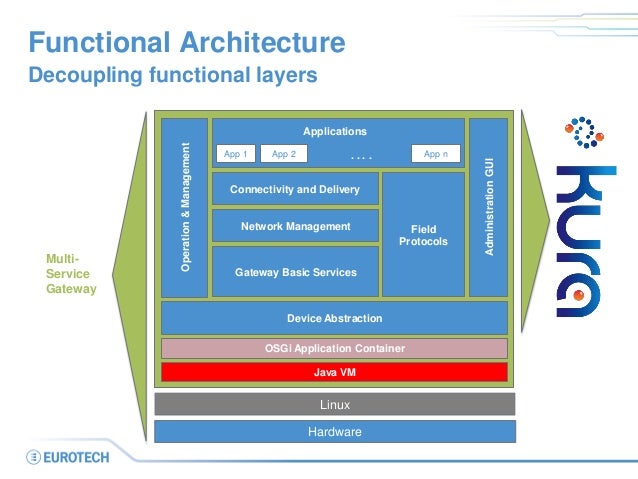
If you are wondering where Kura Camel project fits into the Kura architecture - our quickstart is deployed into the application layer of Kura, with a dedicated Camel context instance per application bundle.


Creating a Kura Camel project

In order to create the Kura Camel project from Rhiot quickstart execute the following commands:
git clone git@github.com:rhiot/quickstarts.git
cp -r quickstarts/kura-camel kura-camel
cd kura-camel
mvn install

Prerequisites

We presume that you have Eclipse Kura already installed on your target device. And that you know the IP address of that device. If you happen to deploy to a Raspbian-based device, and you would like to find the IP of that Raspberry Pi device connected to your local network, you can use the Rhiot device scanner, as demonstrated on the snippet below:
docker run --net=host -it rhiot/deploy-gateway scan
The command above will return an output similar to the one presented below:
Scanning local networks for devices...

======================================
Device type     IPv4 address
--------------------------------------
RaspberryPi2        /192.168.1.100
Keep in mind that /opt/eclipse/kura/kura/config.ini file on your target device should have OSGi boot delegation enabled for packages sun.*,com.sun.*. Your /opt/eclipse/kura/kura/config.ini should contain the following line then:
org.osgi.framework.bootdelegation=sun.*,com.sun.*
A boot delegation of sun packages is required to make Camel work smoothly in an Equinox.

Deployment

In order to deploy Camel application to a Kura server, you have to copy necessary Camel jars and a bundle containing your application. Your bundle can be deployed into the target device by executing an scp command. For example:
scp target/rhiot-kura-camel-1.0.0-SNAPSHOT.jar pi@192.168.1.100:/tmp
The command above will copy your bundle to the /tmp/rhiot-kura-camel-1.0.0-SNAPSHOT.jar location on a target device. Use similar scp command to deploy Camel jars required to run your project:
scp ~/.m2/repository/org/apache/camel/camel-core/2.16.0/camel-core-2.16.0.jar pi@192.168.1.100:/tmp
scp ~/.m2/repository/org/apache/camel/camel-core-osgi/2.16.0/camel-core-osgi-2.16.0.jar pi@192.168.1.100:/tmp
scp ~/.m2/repository/org/apache/camel/camel-kura/2.16.0/camel-kura-2.16.0.jar pi@192.168.1.100:/tmp
Now log into your target device Kura shell using telnet:
telnet localhost 5002
And install the bundles you previously scp-ed:
install file:///tmp/camel-core-2.16.0.jar
install file:///tmp/camel-core-osgi-2.16.0.jar
install file:///tmp/camel-kura-2.16.0.jar
install file:///tmp/rhiot-kura-camel-1.0.0-SNAPSHOT.jar
Finally start your application using the following command:
start 
Keep in mind that bundles you deployed using the recipe above are not installed permanently and will be reverted after the server restart. Please read Kura documentation for more details regarding permanent deployments.

What the quickstart is actually doing?

This quickstart triggers Camel timer event every second and sends it to the system logger using Camel Log component. This is fairy simple functionality, but enough to demonstrate the Camel Kura project is actually working and processing messages. 
The snippet below demonstrates the code of the route:
public class GatewayRouter extends KuraRouter {

    @Override    public void configure() throws Exception {
        from("timer://heartbeat").
                to("log:heartbeat");
    }

    ...

}

If you are curious how can you create more complicated routes connected to Kura internal services, you would be interested in incoming articles demonstrating those features.   

Monday, October 26, 2015

Going to EclipseCon? Come to my Camel+Kura talk!

Next Tuesday I will be at the EclipseCon EU 2015 where I will deliver Team up! Eclipse Kura and Apache Camel for IoT Gateways talk. That will be a joint talk I'm gonna give together with the EuroTech's Luca Dazi.

If you wanna catch up with me, feel free to ping me via twitter's @hekonsek.

About my talk:

Data gathering from the field and delivery to the Cloud is a common task in IoT solutions.
Developers find themselves struggling with field protocols on one side, and data delivery protocols on the other.
Eclipse Kura is the Open Source M2M Software Framework of choice for IoT Gateways, and it's well known for its ease of use and flexibility, and Apache Camel is a message routing engine providing out of the box dozens of connectors to different endpoints.
Eclipse Kura and Apache Camel, when joined together, give developers the possibility to abstract their application logic from both field protocols and data delivery, thus easing and speeding up the development process.
This talk will show how Kura and Camel can work together, showing several examples on how to gather data from the field using Kura APIs, and how to deliver messages to several data gathering endpoints using Camel APIs.

About EclipseCon:

EclipseCon Europe is the Eclipse Foundation’s primary European event designed to create opportunities for the European Eclipse community to learn, explore, share and collaborate on the latest ideas and information about Eclipse and its member companies.
EclipseCon is all about community. Contributors, adopters, extenders, service providers, consumers and business and research organizations gather to share their expertise and learn from each other. EclipseCon delivers networking opportunities that lead to synergies in the community, as well as opportunities to give and receive help on specific technical issues or to generate business opportunities

Wednesday, September 30, 2015

Meet me at the ApacheCon Core EU 2015

This Friday I will be speaking at the ApacheCon EU 2015, in Budapest. The even takes place at the same venue as a year before i.e. at lovely Corinthia Hotel Budapest. I will be giving two IoT related talks:


I will be in Budapest for Thursday and Friday. If you are at the Budapest at this time, feel free to drop me a line!

About ApacheCon Core:
Core will bring together the open source community to learn about and collaborate on the technologies and projects driving the future of open source, web technologies and cloud computing. Apache projects have and continue to be hugely influential in the innovation and development of software development across a plethora of categories from content, databases and servers, to big data, cloud, mobile and virtual machine. The developers, programmers, committers and users driving this innovation and utilizing these tools will meet in Budapest, October 1 & 2, for collaboration, education and community building.

Monday, May 18, 2015

Make your IoT gateway WiFi-aware using Camel and Kura

This is re-post of my DZone article - Make Your IoT Gateway WiFi-Aware Using Camel and Kura. The original DZone article has been published last week.

The common scenario for the mobile IoT Gateways, for example those mounted on the trucks or the other vehicles, is to cache collected data locally on the device storage and synchronizing the data with the data center only when trusted WiFi access point is available near the gateway. Such trusted WiFi network could be localized near the truck fleet parking.


Using this approach, less urgent data (like GPS coordinates stored for the further offline analysis) can be delivered to the data center without the additional cost related to the GPS transmission fees.


Camel Kura WiFi component from the Camel IoT Labs can be used to retrieve the information about the WiFi access points available within the device range. Under the hood Kura Wifi component uses Kura org.eclipse.kura.net.NetworkService.

Setting up of the Maven project


In order to take advantage of the Camel Kura WiFi component, Maven users should add the following dependency to their POM file:

<dependency>
  <groupId>com.github.camel-labs</groupId>
  <artifactId>camel-kura</artifactId>
  <version>0.0.0</version>
</dependency>

All the other dependencies will be pulled by the Maven transitive resolver.
 

Creating Camel route scanning the WiFi networks


Kura WiFi component supports both the consumer and producer endpoints. In practice it means that you can either periodically scan for the WiFi networks (consumer mode) or explicitly request the single scan (producer mode).

The following Apache Camel route will use the wlan0 interface to scan for the mySsid network. If the mySsid WiFi network will be found, Camel will automatically start the route responsible for the synchronization of the offline data stored on the device local storage with the data center:

  from("kura:wlan0/mySsid").
      to("controlbus:route?routeId=onlineSync&action=start");

  from("file:///var/sensor/temperature").
      routeId("onlineSync").autoStartup(false).
      to("netty4-http://api.mydatacenter.com");
Keep in mind that both network interface and SSID can be replaced with the * wildcards matching respectively all the network interfaces and SSIDs.

For example to read all the SSID available near the device, the following route can be used:

    from("kura:*/*").to(...);


Data returned by the WiFi endpoints


The Kura WiFi consumer returns the list of the org.eclipse.kura.net.wifi.WifiAccessPoint classes returned as a result of the WiFi scan:
    ConsumerTemplate consumerTemplate = camelContext.createConsumerTemplate();
    WifiAccessPoint[] accessPoints = consumerTemplate.receiveBody("kura:wlan0/*", WifiAccessPoint[].class);
You can also request the WiFi scanning using the producer endpoint:
        from("direct:WifiScan").to("kura-wifi:*/*").to("mock:accessPoints");
 
Or using the producer template directly:

    ProducerTemplate template = camelContext.createProducerTemplate();
    WifiAccessPoint[] accessPoints = template.requestBody("kura-wifi:*/*", null, WifiAccessPoint[].class);


Deployment options


Camel Kura WiFi component can be deployed either as the OSGi bundle, directly into the Kura container:

  public class WifiKuraRouter extends KuraRouter {

    @Override
    public void configure() throws Exception {
      from("kura-wifi:*/*").to("log:availableWifiNetworks");
    }

  }

...where KuraRouter is the base OSGi bundle activator for Camel routes deployable into Kura.

The other option of deployment is to use Spring Boot based fat jar:

  @SpringBootApplication
  public class WifiKuraRouter extends FatJar {

    @Override
    public void configure() throws Exception {
      from("kura-wifi:*/*").to("log:availableWifiNetworks");
    }

  }

In the first place Kura Wifi component tries to locate the org.eclipse.kura.net.NetworkService instance in the Camel registry. If exactly one instance of the NetworkService is found (this is usually the case when if you deploy the route into the Kura container), that instance will be used by the Kura component. Otherwise new instance of the org.eclipse.kura.linux.net.NetworkServiceImpl will be created and cached by the KuraAccessPointsProvider.


Summary


Smart WiFi connectivity is fundamental for every mobile IoT gateway solution. Camel Kura WiFi integration makes WiFi scanning process as easy as adding a few lines of the DSL. Your gateway application should try to cache the data collected from the sensors and avoid using the expensive mobile connectivity whenever possible. The efficient IoT gateway should synchronize the stored offline data when the trusted WiFi network is available.

Saturday, February 28, 2015

Apache Camel in the IoT world: Eclipse Kura component

Eclipse Kura is an OSGi based framework dedicated for the M2M gateways based on the small computing platforms like Raspberry Pi or BeagleBoard Black. If you consider using Kura in your M2M gateway and and the same time you would like to take advantage of the rich set of Apache Camel components and its EIP capabilities, then Camel Kura component is something for you. Camel Kura component will be available starting from the Camel 2.15.0.

Camel Kura architecture

The common reason to deploy Camel routes into the Eclipse Kura is to provide enterprise integration patterns and Camel components to the messaging M2M gateway. For example you might want to install Kura on Raspberry PI, then read temperature from the sensor attached to that Raspberry PI using Kura services and finally forward the current temperature value to your data center service using Camel EIP and components. The diagram below demonstrates the architecture of the Camel solution deployed into the Eclipse Kura: 

How can I activate my route?

Bundles deployed to the Eclipse Kura are usually developed as bundle activators. So the easiest way to deploy Apache Camel routes into the Kura is to create an OSGi bundle containing the class extending org.apache.camel.kura.KuraRouterclass:


public class MyKuraRouter extends KuraRouter {
  @Override
  public void configure() throws Exception {
    from("timer:trigger").
      to("netty-http:http://app.mydatacenter.com/api");
  }
}

Keep in mind that KuraRouter implements the org.osgi.framework.BundleActivator interface, so you need to register its start and stop lifecycle methods while creating Kura bundle component class.
Kura router starts its own OSGi-aware CamelContext. It means that for every class extending KuraRouter, there will be a dedicated CamelContext instance. Ideally we recommend to deploy one KuraRouter per OSGi bundle.

How can I deploy my KuraRouter

Bundle containing your Kura router class should import the following packages in the OSGi manifest:

Import-Package: org.osgi.framework;version="1.3.0",
  org.slf4j;version="1.6.4",
  org.apache.camel,org.apache.camel.impl,org.apache.camel.core.osgi,org.apache.camel.builder,org.apache.camel.model,
  org.apache.camel.component.kura

Keep in mind that you don't have to import every Camel component bundle you plan to use in your routes, as Camel components are resolved as the services on the runtime level.
Before you deploy your router bundle, be sure that you have deployed (and started) the following Camel core bundles (using Kura GoGo shell)...

install file:///home/user/.m2/repository/org/apache/camel/camel-core/2.15.0/camel-core-2.15.0.jar
start <camel-core-bundle-id>
install file:///home/user/.m2/repository/org/apache/camel/camel-core-osgi/2.15.0/camel-core-osgi-2.15.0.jar
start <camel-core-osgi-bundle-id>
install file:///home/user/.m2/repository/org/apache/camel/camel-kura/2.15.0/camel-kura-2.15.0.jar
start <camel-kura-bundle-id>

...and all the components you plan to use in your routes:

install file:///home/user/.m2/repository/org/apache/camel/camel-stream/2.15.0/camel-stream-2.15.0.jar
start <camel-stream-bundle-id>

Then finally deploy your router bundle:

install file:///home/user/.m2/repository/com/example/myrouter/1.0/myrouter-1.0.jar
start <your-bundle-id>

Some KuraRouter utilities to make your life easier 

 Kura router base class provides many useful utilities. Let 's explore some of them.


SLF4J logger
Kura uses SLF4J facade for logging purposes. Protected member log returns SLF4J logger instance associated with the given Kura router.

public class MyKuraRouter extends KuraRouter {
    @Override
    public void configure() throws Exception {
        log.info("Configuring Camel routes!");
        ...
    }
}

BundleContext
Protected member bundleContext returns bundle context associated with the given Kura router.

public class MyKuraRouter extends KuraRouter {
    @Override
    public void configure() throws Exception {
        ServiceReference serviceRef = bundleContext.getServiceReference(LogService.class.getName());
        MyService myService = content.getService(serviceRef);
        ...
    }
}

CamelContext
Protected member camelContext is the CamelContext associated with the given Kura router.

public class MyKuraRouter extends KuraRouter {
    @Override
    public void configure() throws Exception {
        camelContext.getStatus();
        ...
    }
}

OSGi service resolver

OSGi service resolver (service(Class serviceType)) can be used to easily retrieve service by type from the OSGi bundle context.

public class MyKuraRouter extends KuraRouter {
    @Override
    public void configure() throws Exception {
        MyService myService = service(MyService.class);
        ...
    }
}

How can I configure CamelContext used by KuraRouter?

Kura router comes with the lifecycle callbacks that can be used to customize the way the Camel router works. For example to configure the CamelContext instance associated with the router just before the former is started, override beforeStartmethod of the KuraRouter class:

public class MyKuraRouter extends KuraRouter {
  ...
  protected void beforeStart(CamelContext camelContext) {
    OsgiDefaultCamelContext osgiContext = (OsgiCamelContext) camelContext;
    osgiContext.setName("NameOfTheRouter");
  }
}

What's next?

The current version of the Camel Kura component provides some useful utilities and simplifies Camel deployments into Kura by providing the opinionated Camel router. However there is still a space for the improvements in the regards of Camel Kura functionality. For example I can imagine predefined Camel components providing consumers/producers for the device services provided by the Kura. Or predefined Camel expressions that could be used to perform the content based routing based on the data read from the Raspberry Pi sensors. I plan to add more features to the Camel Kura in the next releases of Camel. Keep also in mind that we do love contributors in the Apache Camel community  - if you think you got something that could be added to the Camel Kura, just drop me a line!