The problem
The problem with an
amazing Cloud Foundry, is that due to the limitations of beta version, it doesn't support mapping of custom (aka
external) domains to the applications. It's a pity since free Cloud Foundry account has some
impressive quota and could be used for initial production deployment of many web applications.
Are we then doomed to the http://applicationWithUglyUrl.cloudfoundry.com kind of URLs when deploying to the Cloud Foundry?
Reverse proxy to the rescue
The trick to deal the with ugly domain names is to use
reverse proxy to forward requests from our custom domain to the Cloud Foundry application.
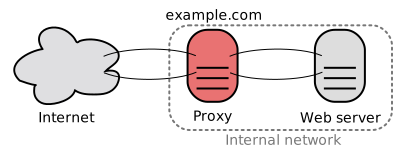
Reverse proxy allows to transparently forward HTTP requests from one server to another. The interesting side effect of the usage of reverse proxy is that you can hide your destination server behind the domain name mapped to that proxy.
Reverse proxy and the Cloud Foundry
In the case of Cloud Foundry you need to configure your custom domain (for example myapplication.com) to point to some reverse proxy. Then configure the reverse proxy to forward the requests matching your custom domain (http://myapplication.com) to the Cloud Foundry instance (for example http://myapplication.cloudfoundry.com).
What if I don't have Apache HTTP instance?
- download Python Google App Engine SDK and unzip it.
- create application for proxy on Google App Engine (give it a nice name, like myapplication-proxy).
- download bs2grproxy application template and unzip it.
- open file bs2grpconfig.py in text editor and change value of TARGET_HOST property to the address of your Cloud Foundry application (for example to the http://myapplication.cloudfoundry.com).
- open file app.yaml in text editor and set the proper id and version of your Google App Engine proxy application (for example application: myapplication-proxy and version: 1).
- install Python (sudo apt-get install python under Ubuntu) since bs2grproxy is written in it.
- from Python GAE SDK directory execute the following command - ./appcfg.py update /home/user/projects/myapplication-proxy . The latter command will deploy your proxy application to the Google App Engine infrastructure.
- since Google App Engine allows you to configure custom external domains even for free accounts, set your custom domain (myapplication.com in our example) to point to the proxy deployed on the Google App Engine (for example to myapplication-proxy.appspot.com).
Congratulations. From now on all requests to the http://myapplication.com will be transparently forwarded by reverse proxy to the http://myapplication.cloudfoundry.com.
What about the other hosting providers?
Remember that you can use reverse HTTP proxy to mirror any domain. So you can use it to deal with all kinds of ugly URL mappings.